See what every LinkedIn account is doing, right now
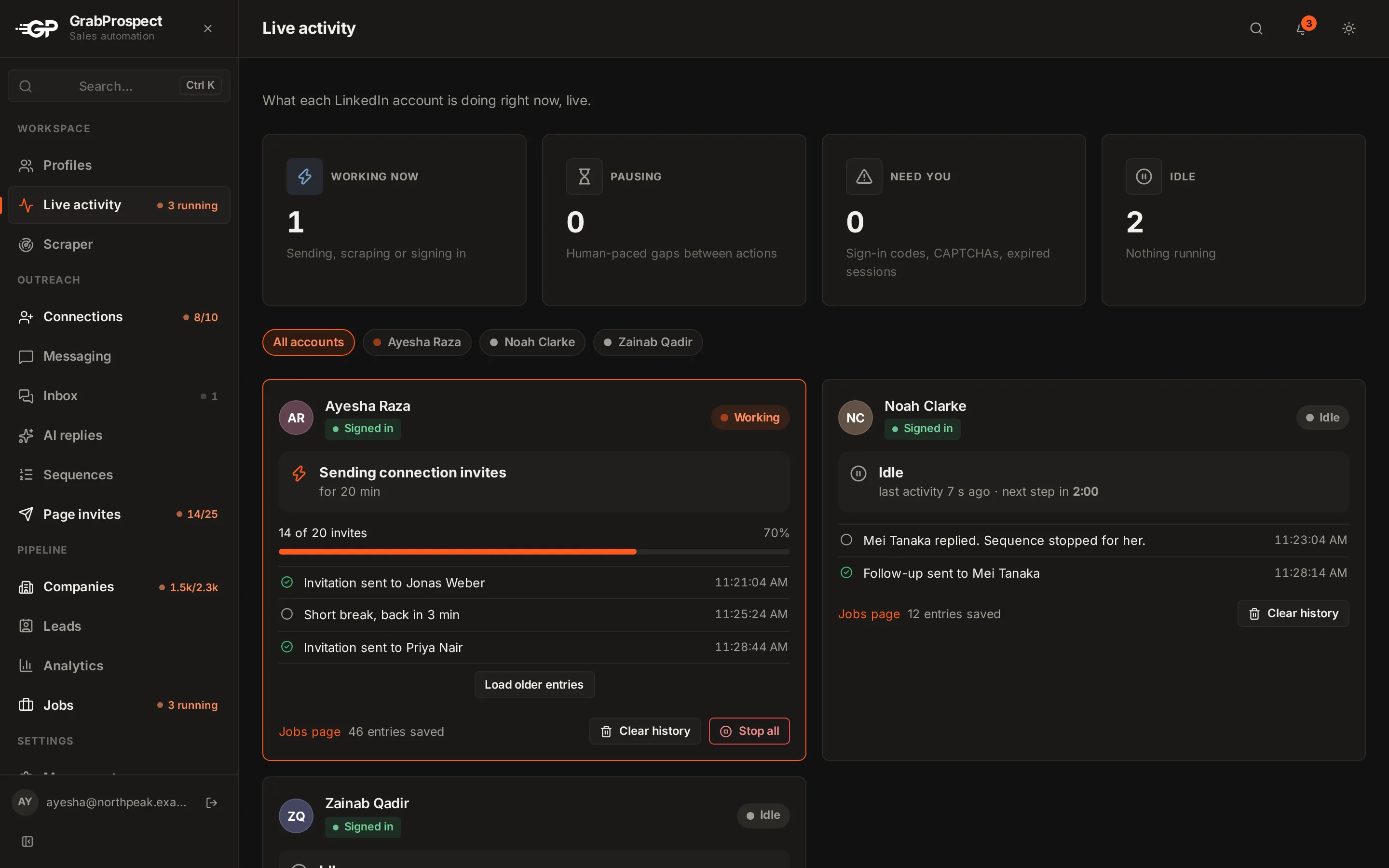
Automation shouldn't be a black box. The live view shows each LinkedIn account's current state (working, on a break, needs you) and what it's doing, and every running task shows its progress as it happens.
Try every feature free for 7 days, no card needed.
How it works
- 1
Open Live activity
Every account in your workspace, with its current state.
- 2
See the work
Each action as it happens: scraping page 4, sending an invite, pausing between actions.
- 3
Act when needed
If LinkedIn asks for a sign-in code, the account shows Needs you and the app asks for the code.
- 4
Follow progress anywhere
The sidebar shows what's running with live progress, like 8 of 10.
The details
Working, break, needs you
Know at a glance which accounts are active and which need a hand.
Waiting tasks say why
A queued task tells you what it's waiting for: a free slot, the account's other task, its working hours.
Every task logged
Full history of scrapes, invites and messages, with filters, pages and CSV downloads.
Notifications
Finished tasks, limits reached, errors and accounts that need you, in the app and by email.
Team view
Admins see the whole team's activity in one place.
Daily summary
An optional email with what every account did that day.
Live activity: questions
Can I see what my LinkedIn automation is doing?
Yes. The live view shows each account's state and current action, and every task shows live progress.
What happens when LinkedIn asks for a verification code?
The account is marked Needs you and the app asks for the code. Once entered, it continues where it left off.
Will I be notified when something goes wrong?
Yes. Errors, limits reached and accounts that need you appear in the app and, if you choose, by email.
Guides on this
- Tools and comparisonsCloud vs Chrome Extension vs Desktop: How LinkedIn Automation Tools WorkThe three ways LinkedIn automation tools run, what each means for reliability, safety, setup and cost, and how to choose the right type for your outreach.3 min read
- LinkedIn limits and safetyHow to Use LinkedIn Automation Without Getting RestrictedAn honest guide to LinkedIn automation risk, what LinkedIn actually watches for, safe daily numbers, and a checklist for running outreach that looks and behaves human.5 min read
- OutreachRunning LinkedIn Outreach for Clients: An Agency Guide to Multiple AccountsHow agencies run LinkedIn outreach for several clients safely, from connecting client accounts and separating campaigns to handling sign-in codes, replies and reporting.4 min read
See it run on your own search
Start a 7-day free trial with your own LinkedIn account, or book a call with Mehran, our co-founder, and see a Sales Navigator search split, invited and followed up, live.
7 days free. No card needed.